Linux
Linux runs on the RISC-V processor. It is a small distribution with the common command line tools from busybox, Lua, MicroPython and the
tcc C compiler. It supports every device in this manual.Parts
Build the computer as described in getting started, using these parts:
- 1x computer
- 1x RISC-V processor
- 1x Sedna Firmware flash memory, crafted from flash memory and a RISC-V processor
- 1x Sedna Linux hard drive, crafted from an 8M hard drive and a RISC-V processor
- 3x 4M memory
Linux needs at least 8M of memory, 10M are highly recommended.
Logging In
Power the computer, turn it on and wait until you're prompted for a login.
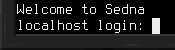
Enter
root as the user name and press enter. The root account has no password.The System
The shell and most tools come from busybox, so the usual commands such as
ls, cp, cat and less work as on any other Linux. To edit files, use vi or nano.To run a Lua script, use
lua script.lua. Run lua without arguments for the interactive prompt. MicroPython works the same, via micropython. Compile and run C programs with tcc -run program.c.To turn the computer off from the shell, run
poweroff. reboot restarts it.Drives
The boot drive is
/dev/vda. Additional hard drives, disk drives and flash drives follow as /dev/vdb, /dev/vdc and so on.They are not automatically mounted. Use
mount /dev/vdb /mnt/data to mount tem. The directory must exist and should be empty. Use umount /mnt/data unmounts it.A new drive needs a file system first. Run
mke2fs /dev/vdb to create one. Formatting a drive erases all data on it!Floppies can be swapped at any time. Unmount before removing a floppy, to avoid data loss.
Devices
To control devices such as the redstone interface from Lua or MicroPython, use the
devices library, see the high-level API. C programs can also use the mid-level API. lsdev lists the connected devices.The built-in file system at
/mnt/builtin also provides import and export for the file import/export card, and the robot library for robots.Clocks
Computers provide two hardware clock (RTC) devices. The first one counts time in a scale most users will think in. It is used by default, for example by
date and time. The second one measures time as it works in the world the computer runs in. To obtain the current world time, use hwclock -f /dev/rtc1.